The enterprise architecture shift: Orchestration platforms are replacing traditional integration stacks
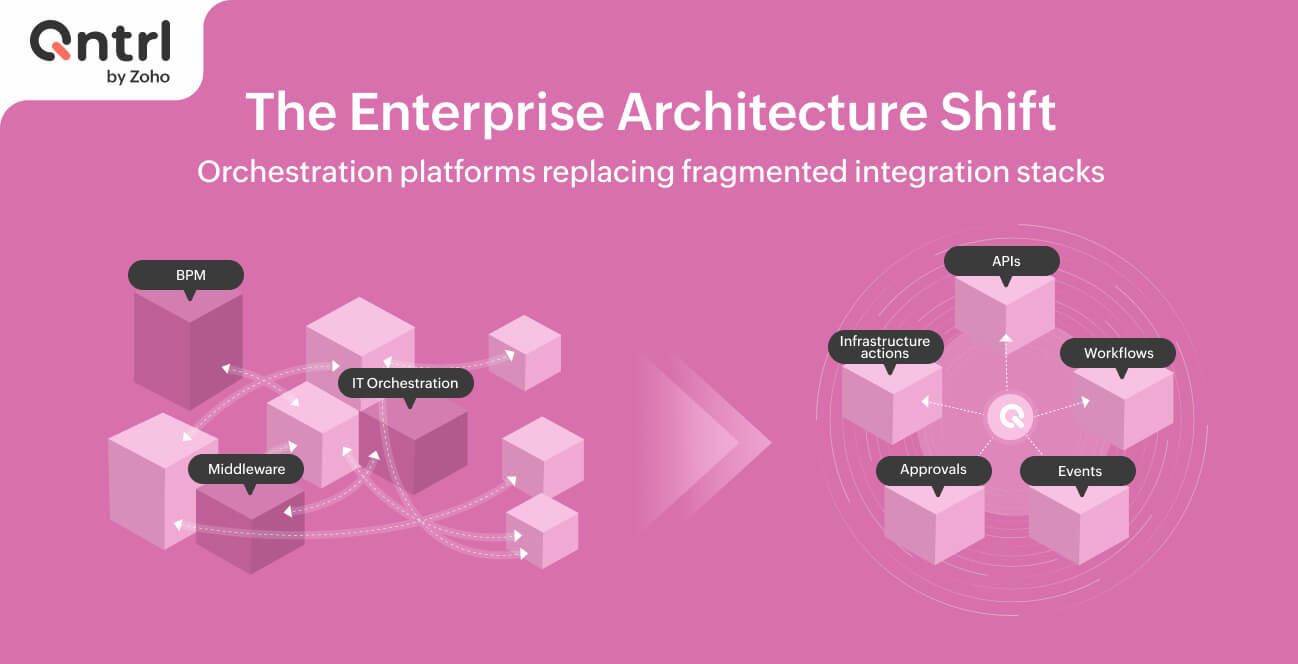
Enterprise orchestration stacks have traditionally been a fragmented endeavor: middleware for data movement, BPM engines for process design, and IT orchestration tools for operational workflows. That is, until the emergence of unified orchestration layers.
This separation made sense when these domains didn't interact, but today, it creates architectural friction.
And at scale, this fragmentation compounds. A single business process, such as order-to-cash, user provisioning, or incident resolution, now requires coordination, and most importantly, visibility across all three layers.
But managing these layers with separate tools introduces integration overhead, operational complexity, and visibility gaps.
The architectural shift is real, and enterprises are consolidating onto unified orchestration platforms that span middleware, BPM, and IT orchestration in a single execution layer.
Reality of traditional stacks
Integration platforms
Integration platforms handle data movement. They solve the API and data-at-rest problem: how to move data between systems.
BPM engines
BPM engines model business processes. They excel at process design and human workflow, but typically don't coordinate system execution tightly.
IT orchestration tools
IT orchestration tools handle infrastructure and IT workflows. They focus on IT-specific operations like ticket management, change control, and infrastructure provisioning.
The integration problem
These three layers don't communicate natively; connecting them requires manual integration work through API adapters, custom code, or external glue layers.
A user provisioning process might need:
The integration platform to pull HR data
The BPM engine to route approvals
The IT tool to execute Active Directory account creation
Each handoff introduces coupling, latency, and failure points.
Real costs
Licensing: Three platforms multiplied by licensing costs
Operations overhead: Three teams (integration, BPM, IT operations) instead of one
Development velocity: Adding a new workflow requires changes across three systems
Visibility: No unified view of process execution—IT sees tickets, BPM sees process states, and the integration platform sees data movement
Debugging: Workflow failures require troubleshooting across three platforms
Compliance: Audit trails exist in three separate systems, and stitching them together is manual
Example
An enterprise with 500+ ongoing workflows across these three categories might maintain:
6–8 full-time equivalents (FTE) for integration platform management
4–5 FTEs for BPM and process management
6–8 FTEs for IT operations and orchestration
Additional architects and business analysts coordinating across all three
Under orchestration-first
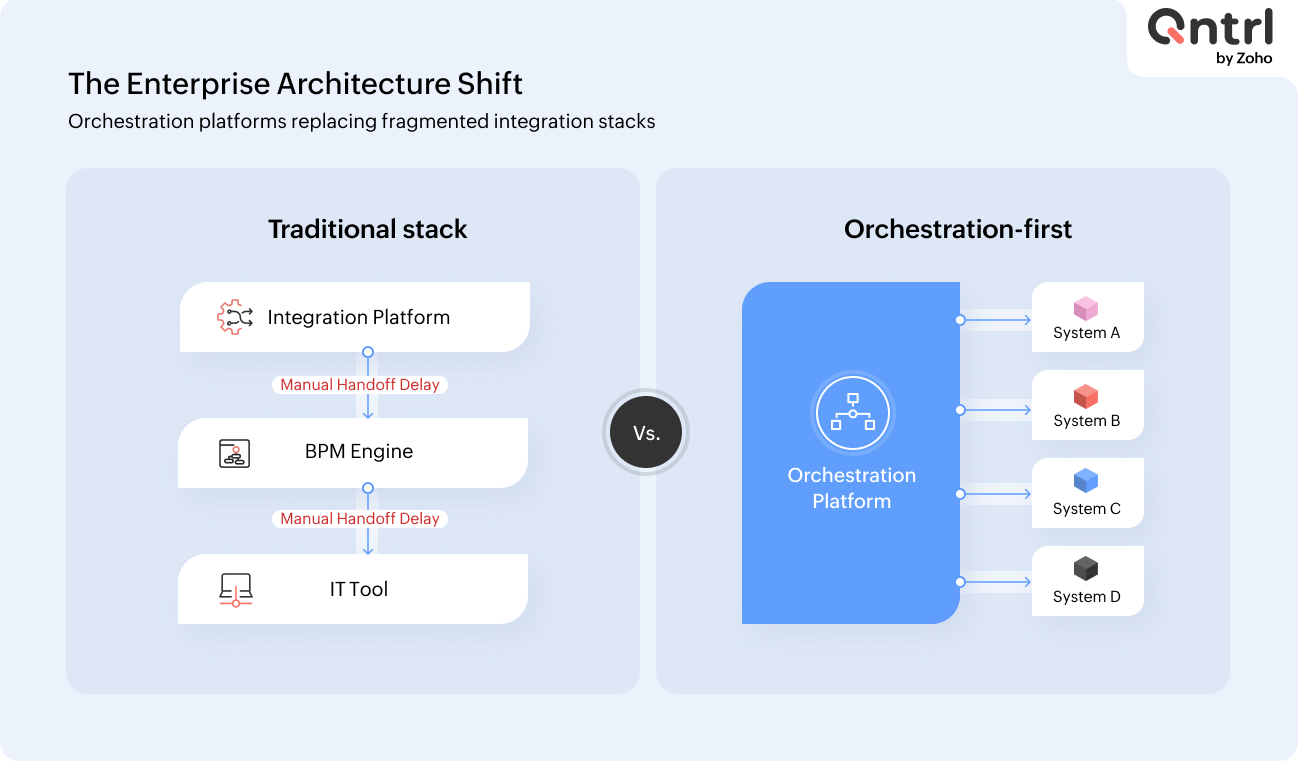
An orchestration platform is inherently different from any of the three legacy categories. It's not "a little bit of each"—it's a unified execution runtime designed to coordinate workflows, systems, approvals, and logic into a single, governed process.
Key architectural difference
The orchestration platform doesn't separate concerns; it coordinates across them:
Integration
This is handled through APIs, webhooks, and message brokers, but coordinated holistically rather than point-to-point.
BPM
Workflows execute within the same runtime rather than in a separate engine.
IT operations
Operational workflows, such as incident response, provisioning, and changes, follow the same governance as business workflows.
Reality of a unified orchestration layer
Single execution runtime
One platform executes all workflow types. When a workflow is triggered by an alert, request, or event, it lives in a single place and is managed by a single engine.
Native multi-system coordination
Instead of an orchestration platform calling an integration platform, which then calls a BPM engine, the orchestration platform coordinates all systems directly through APIs, webhooks, or bridges.
Unified state management
A workflow's state isn't scattered across three tools. One system tracks:
Workflow progress
Trigger source
Approval state
Audit history
Execution status
Integrated governance
You have one RBAC model, one audit trail, and one SLA enforcement mechanism instead of three separate governance layers.
Hybrid connectivity
The platform can orchestrate:
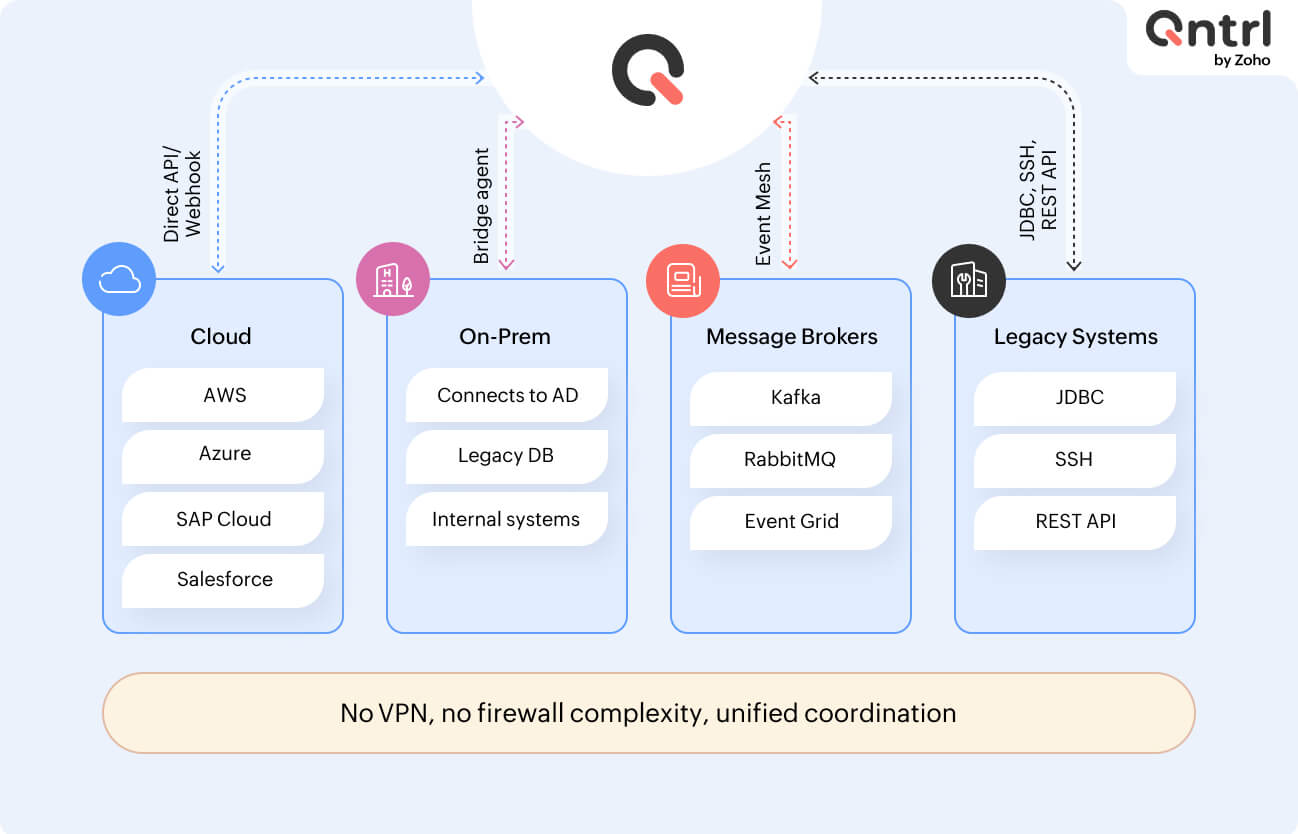
Cloud systems through APIs
On-premise systems through secure bridge connectivity
Message brokers through native integrations
And it's all within one workflow.
Platform capabilities in orchestration-first systems
Workflow execution engines replacing separate BPM and IT orchestration tools
Event-driven orchestration replacing middleware event routing
Secure on-prem connectivity replacing VPN-heavy architectures
REST, SOAP, and webhook execution replacing point-to-point integrations
Approval gates replacing disconnected approval workflows
Real-time SLA tracking replacing manual SLA monitoring and delayed escalations
Unified audit trails replacing scattered execution logs
The operational difference
Traditional stack with multiple tools
HR system sends new employee record
Integration platform picks up the event and transforms data
BPM engine routes approvals
IT orchestration tool executes account creation and provisioning
Each platform logs its own part of execution
And as a result, HR sees "employee hired," BPM sees "approvals completed," and IT sees "accounts created," but no single view shows the entire flow
Orchestration-first hosted on a single platform
HR event triggers a unified workflow
Platform coordinates manager approval, IT review, and data validation in parallel
Platform executes API calls to identity and provisioning systems
Platform enforces SLAs like provisioning within four hours
Now a single dashboard shows the entire flow, with a single audit trail and a single escalation point in case of an SLA breach.
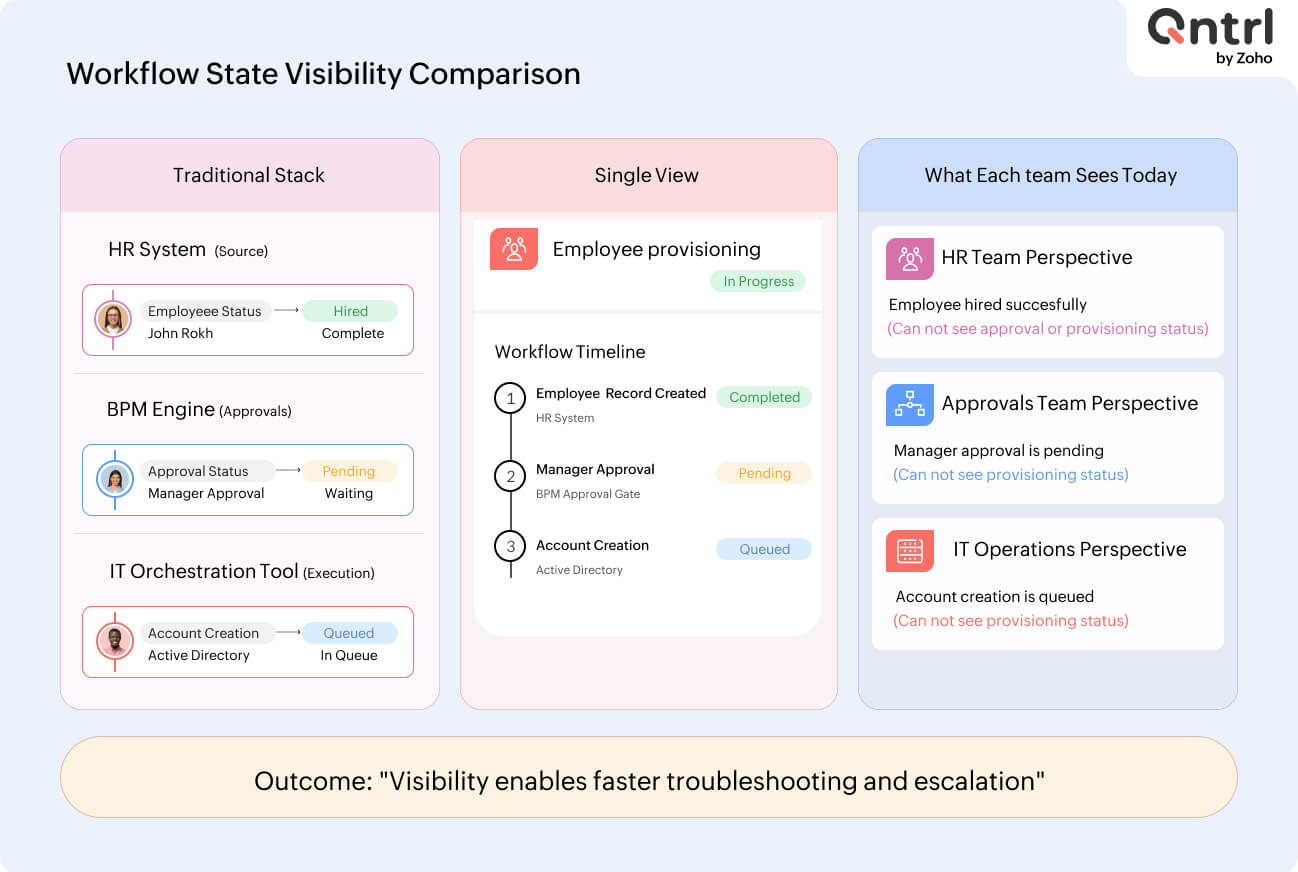
The orchestration platform can execute actions in parallel and across conditional paths. Traditional approaches require integrating outputs from three separate systems, introducing latency between stages.
What to look for when evaluating an orchestration platform
Connectivity model
The platform must connect to existing systems without forcing a rip-and-replace strategy.
Common orchestration platform approaches
APIs and webhooks for direct cloud integrations
Secure bridge connectivity for on-premise systems
Native integrations with message brokers and cloud services
Legacy system support for SAP, Oracle, and internal databases
What to evaluate
Can the platform connect to existing systems without significant integration work?
If it requires custom adapters or major rebuilds, it defeats the purpose of consolidation.
Workflow state and visibility
The platform must provide real-time, queryable visibility into every workflow instance.
Typical implementation requirements
Explicit workflow states, such as pending approval, executing, completed, and failed
Dashboards showing live workflow instances
Approval gates visible within execution state
Real-time SLA tracking instead of retroactive calculations
Accelerated visibility
This requires the platform to track the workflow state in a queryable database rather than simply logging events. Logging is not visibility.
Audit and governance
Enterprise governance requirements include:
Who performed an action
When it happened
Why it happened
What decisions were made
Orchestration platform implementation
Timestamped actions with user attribution
Approval history with comments and timestamps
Execution logs for API payloads
SLA breach escalation records
Going beyond logging
Audit trails need to be immutable and tamper-evident. Standard log files aren't sufficient.
Where orchestration-first makes sense
Consolidate onto an orchestration platform if:
The organization has more than 100 people.
There are five or more ongoing complex workflows requiring cross-system coordination.
Unified governance and compliance visibility are required.
A 3–5 year infrastructure roadmap is being planned.
Future support is needed for AI agents, mobile workflows, or event-driven systems.
Keep separate tools if:
Only a single use case exists, such as API gateway management.
The organization has fewer than 50 people.
Existing vendor relationships and migration costs outweigh the benefits.
The evaluation framework
Must-haves
Native multi-layer design treating BPM, middleware, and IT orchestration as one runtime
Real-time workflow state visibility
Native hybrid connectivity across cloud and on-premise systems
Unified governance, including RBAC, audit trails, and SLA enforcement
Differentiators
Ability to handle 1,000+ concurrent workflows
Strong developer and low-code user experience
Built-in observability and debugging
Broad native integration ecosystem
Flaggable
"Use your integration platform for APIs and this for workflows"
"Query the logs to understand workflow status"
"Set up a VPN for on-premise systems"
"Custom coding is required for your legacy system"
Migration path
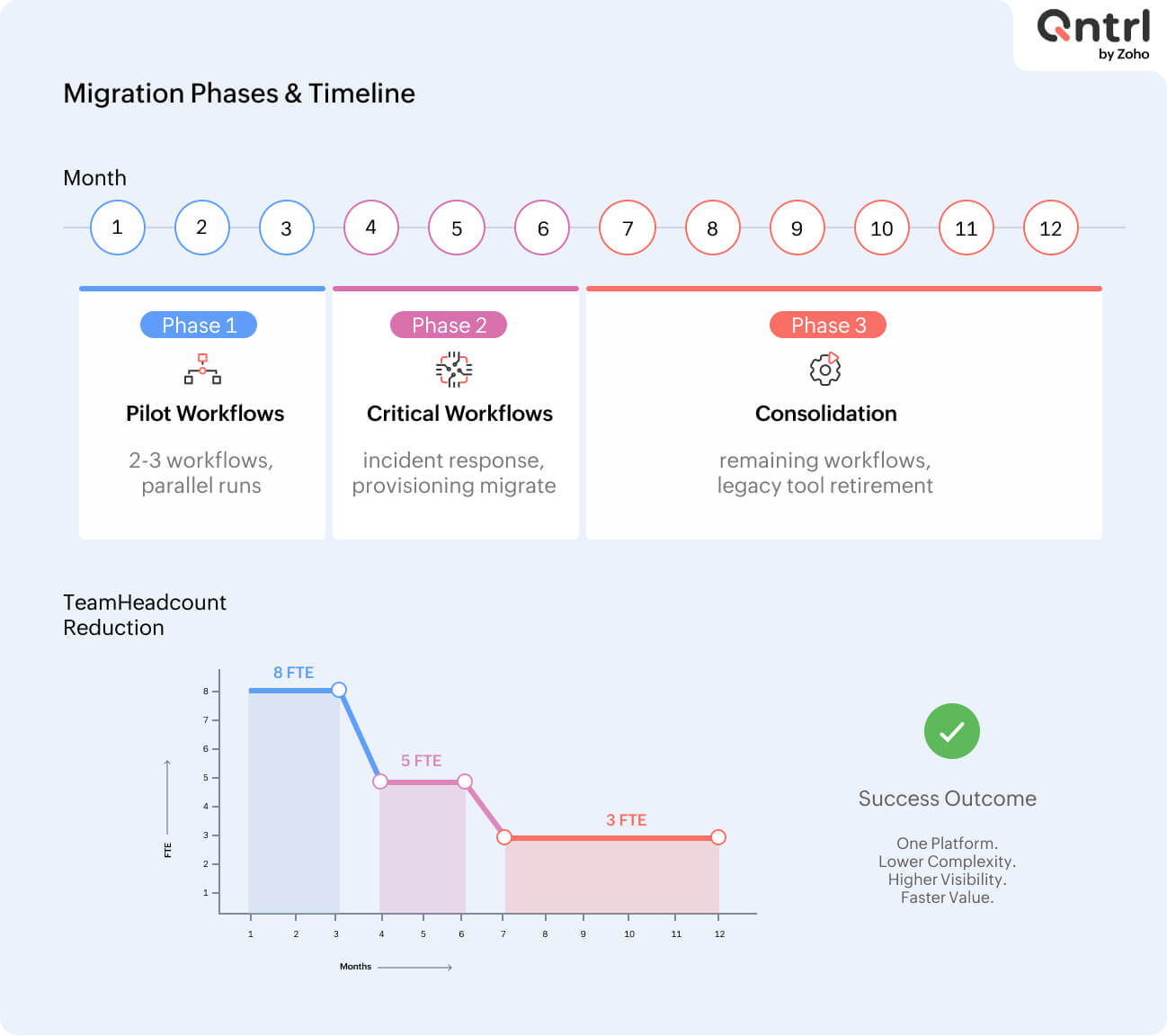
Phase 1: Pilot on non-critical workflows
Choose workflows spanning multiple legacy tools.
Run orchestration workflows in parallel with existing systems.
Measure:
Time to build
Operational overhead
Visibility improvements
Phase 2: Migrate critical operational workflows
Start with high-value workflows like incident response and user provisioning.
Remove legacy tool involvement.
Measure:
Time savings
Compliance improvements
Operational visibility
Phase 3: Consolidate and retire redundant tools
Consolidate remaining workflows.
Retire or reduce legacy systems to read-only mode.
Key success factor
Don't replicate legacy architecture exactly. Use orchestration platforms to simplify workflows, automate manual steps, and introduce visibility that didn't previously exist.
Infrastructure implications
Moving to orchestration-first requires rethinking architecture:
From
System A → Integration Platform → BPM → IT Tool → System B
To
System A → Orchestration Platform → System B
All coordinated—all visible.
Implications
Simplified network architecture
Unified governance model
Centralized monitoring
Vendor consolidation
Faster developer onboarding and workflow delivery
How this transforms your business
Typical enterprise benefits include:
Reducing integration tooling and increasing automation initiatives to reduce avoidable manual work and operational effort
Reducing workflow deployment timelines
Reducing manual escalations, approvals, and auditing overhead
Revenue enablement
Faster time to market for new operational processes
Real-time operational visibility
Improved compliance posture through unified audit trails
Example
A 2,000-person enterprise managing 200 workflows across three platforms might see:
8 FTEs reduced to 3 FTEs through consolidation
Workflow deployment time reduced from four weeks to one week
Incident response time reduced from 45 minutes to 15 minutes
Audit preparation reduced from 40 hours to 8 hours
What's next
The architectural shift from fragmented tooling to unified orchestration platforms is already underway. Enterprises that consolidate early gain operational simplicity, lower costs, and higher execution velocity.
Key decisions now
Which workflows are candidates for consolidation?
What is the migration timeline?
Which platform can connect to existing infrastructure without requiring rebuilds?
The platform chosen today will shape enterprise infrastructure for the next five years or more. Evaluate based on architectural fit, not feature checklists.

Enjoying your reading?
Enjoy organization and visibility too!
Qntrl can help you organise, control and improve production and projects in your team.